DIGITAL ENCLOSURES & KIOSKS
Digital Enclosures & Kiosks
Housings & Kiosks Configured Around Your Display
Protective Housings, Freestanding Kiosks & Custom Configurations
JMS supplies and coordinates protective display housings, freestanding kiosks, and integrated display structures. Standard sourced products and custom configurations can both be considered around the selected screen, environment, finish, mounting, and service requirements.
For commercial monitors and mounting hardware without a housing, explore Digital Displays & Mounts.
Review digital kiosk hardware or explore Custom Solutions for project-specific enclosure and mounting needs.
Plan Your Digital Display Project
Share the details you have, even if the project is still taking shape. JMS can help identify the enclosure, mounting, and integration requirements to review before quoting.
01 / Screen & equipment
Screen manufacturer and model, or the desired active-area and overall dimensions; quantity; portrait or landscape orientation; and single- or double-sided layout. If equipment is selected, include cut sheets for displays, media players, touch hardware, and peripherals so mounting interfaces, ventilation, cable routing, and service clearances can be reviewed.
02 / Site & environment
Indoor or outdoor location, sun and weather exposure, available space, and any required environmental ratings. Site photos help explain the conditions.
03 / Mounting & access
Wall, floor, pedestal, or other mounting approach; cable entry, power and data locations, and maintenance access. Include drawings and accessibility requirements if available.
04 / Scope & schedule
Project location, target date, finish, and delivery needs. Tell us who is supplying the screens, software, electrical work, and installation so the quote can define responsibilities.
Our Products

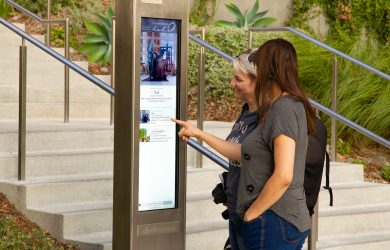
Protective Display Enclosures
Housings reviewed around display dimensions, ventilation, cable routing, service access, and indoor or outdoor conditions. Environmental ratings are confirmed for the selected configuration.
Digital Kiosks
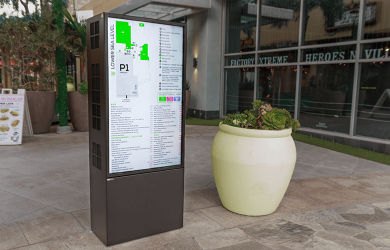
Custom kiosk housings support wayfinding, visitor information, advertising, and interactive applications. We plan around selected displays and peripherals, with mounting, service access, and environmental requirements defined for each project.
Custom Enclosures & Integration
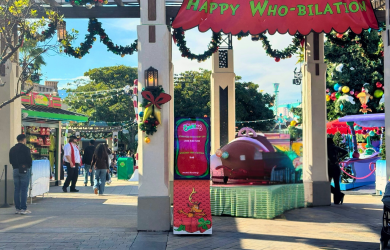
Project-specific dimensions, finishes, screen arrangements, and equipment interfaces coordinated with qualified fabrication partners.
Outdoor Display Enclosures
Project-specific enclosures are reviewed around weather exposure, display heat loads, ventilation or thermal management, electrical connections, service access, and mounting. Outdoor suitability and any required ratings are confirmed for the specific configuration.
Display Pedestals & Mounts
Pedestals, wall mounts, and custom support structures are coordinated around screen size and weight, mounting interfaces, cable routing, service access, and installation conditions.
A kiosk that fits your location
A useful kiosk starts with the details of its location. JMS helps define the housing, finish, mounting, and access requirements, then coordinates a suitable standard product or custom configuration with manufacturing partners.
Photo: Royal Hawaiian Center, Honolulu, Hawaii — a historical DSA project.
- Indoor or outdoor site conditions
- Screen fit & equipment access
- Finish, branding & mounting
- Fabrication & delivery coordination
Why Choose JMS?
Led by Brian Sandore, who has more than 20 years of display engineering, manufacturing, and operations experience, JMS provides responsive engineering and project support. We coordinate qualified fabrication and manufacturing partners from concept through delivery.
Hardware is designed around the selected displays and components, with compatibility, mounting, electrical requirements, certification needs, and service access reviewed for each project.
Any questions? We're here to help.
Project Support & Quality
Engineering & Project Support
Concept development, equipment interfaces, mounting details, and service access coordinated around the installation.
High Quality Products
Qualified fabrication partners, defined specifications, and project-specific quality checks support consistent delivery.
Project-Specific Compliance
Environmental ratings, electrical details, and certification or listed-component options are confirmed for the selected configuration.
Display Integration Support
Coordination around customer-selected screens, players, touch components, and software providers. JMS does not provide its own CMS or cloud service.
Frequently Asked Questions
What is digital signage?
Digital signage uses screens to present images, video, or information. JMS supplies and coordinates the physical enclosure and mounting hardware around customer-selected digital equipment.
How do I update content on my digital menu board or digital display?
Updates are managed through your selected display, media player, or content-management system. The equipment and software provider defines the workflow, connectivity, licensing, and support. JMS can coordinate physical integration requirements with those providers.
What are the benefits of using digital signage?
Digital displays can show changing messages, video, and scheduled content without replacing printed graphics. Available features depend on the selected hardware and software. Content creation, licensing, network service, maintenance, and operating costs should be included in project planning.
Does digital signage cost more than traditional signage?
Costs depend on screen selection, enclosure design, mounting, environmental conditions, installation, and software. JMS quotes its hardware and project-support scope; digital equipment, software subscriptions, and ongoing services are identified separately as applicable.
What sizes are available?
Dimensions are determined by the selected displays, viewing requirements, available space, and mounting conditions. Share your screen model or desired viewing area so JMS can review a suitable enclosure or mounting configuration.
How do I upload content onto my digital monitor?
Follow the instructions supplied by your display, media-player, or CMS provider. Depending on the selected equipment, content may be loaded locally or through a network or cloud service. JMS does not operate a proprietary upload platform.
What is a media player?
A media player delivers content to a display. It may be built into the screen or supplied as a separate device. JMS coordinates space, connections, cooling, and service access around the selected equipment; compatibility and supply scope are confirmed for each project.
How can digital signage improve in-store customer engagement?
Displays can present product information, directions, menus, and timely announcements. The usefulness of the system depends on placement, readable content, and the customer experience; sales or engagement outcomes are not guaranteed.
How does digital signage work?
A display presents content supplied by a connected or integrated media player. Optional CMS software handles functions such as scheduling or remote updates. JMS supports the physical display hardware, while software functionality is provided by the customer’s selected platform.
Why is digital signage important?
Digital signage can help organizations keep information current across commercial spaces. Choosing the right screen, hardware, location, and content workflow is more important than adding features that the project does not need.
JMS Display Systems